

Quick Answer
The front of a membership card typically displays the organization’s name and logo, member name, membership tier, and relevant dates. The back holds functional details such as a barcode, member number, contact information, and brief instructions. Keep sensitive personal information off both sides.
A practical membership card layout separates information people need at a glance from details they use for scanning, assistance, or reference.
Key Points
- Arrange information around how members and staff use the card.
- Reserve space for scanning before adding decorative elements.
- Put detailed benefits and changing information on the carrier or website.
- Test personalized fields and printed codes before approving production.
Why Card Layout Deserves Careful Planning
A membership card serves members, front desk staff, partner locations, and scanning equipment. Each needs to find or read information quickly.
The common CR80 format measures 3.375 by 2.125 inches, the standard size of a credit card. That leaves limited room for branding, personalization, and instructions.
Understanding why organizations still use physical membership cards helps establish design priorities. A card used for daily check-in should emphasize identification and scanning. One used for partner discounts may need a clearly visible membership tier and validity date.
Settle those priorities before artwork begins to avoid missing fields and unnecessary reprints.
What to Put on the Front of a Membership Card
The front should identify the organization, the member, and the membership category.
Front-of-Card Checklist
- Organization name and logo: Make the issuer recognizable without relying on a small logo alone.
- Member name: Include it when the program uses personalized credentials.
- Membership tier: Use clear labels such as Individual, Family, Student, or Premium.
- Relevant date: Print “Valid Through” for visual expiration checks or “Member Since” to recognize longevity.
- Member number: Put it here when staff regularly read or enter it manually.
- Optional branding: Add a tagline or imagery after essential information has enough room.
Variable data printing (VDP) changes individual details within a production run. Names, numbers, tiers, dates, and barcodes can vary while the overall design remains consistent.
Photos are optional. Include one when visual identity checks are part of the program, not simply because the layout has space.
What to Put on the Back of a Membership Card
The back should support scanning, member assistance, and brief reference information.
Back-of-Card Checklist
- Barcode or QR code: Choose the format supported by your equipment or intended destination.
- Printed member number: Place it beneath the barcode as a manual reference.
- Member services contact: Include a website and useful phone number or email address.
- Brief usage terms: State a relevant rule, such as presenting the card for benefits.
- Return instructions: Direct the finder to the organization, not the member’s home address.
- Optional reference details: Add stable information such as a reciprocal-network reminder.
Reserve space for a magnetic stripe before arranging other content. If handwritten entries are needed, specify a writable surface or signature panel.
Front vs. Back at a Glance
“Core” below describes a practical starting point, not a legal requirement.
| Card element | Typical side | Core or optional | Purpose |
| Organization name and logo | Front | Core | Identify issuer |
| Member name | Front | Program-dependent | Identify member |
| Membership tier | Front | If applicable | Identify benefit level |
| Valid-through date | Front | Program-dependent | Support validity checks |
| Member-since date | Front | Optional | Recognize longevity |
| Member number | Either | If assigned | Reference records |
| Barcode or QR code | Back | If used | Scan or open destination |
| Contact information | Back | Recommended | Reach member services |
| Brief terms | Back | Program-dependent | Explain use |
| Signature panel | Back | Optional | Allow handwritten entries |
Placement should follow daily use. An association may prioritize the member number on the front, while a museum may place it beneath a barcode on the back.
Annotated Membership Card Layout Example
This Riverview Nature Center example separates identification from functional details. It is a content-placement guide, not production-ready artwork.

Front Layout
- The organization’s name and logo identify the issuer.
- The member’s name is personalized with variable data printing.
- The written membership tier identifies the category.
- The labeled “Valid Through” date supports visual checks.
- An optional photo supports identity verification when the program needs it.
- The safe zone keeps important text and images away from trimmed edges.
Back Layout
The magnetic stripe area stays clear of other content. The barcode links to the member record and needs quiet zones on both sides. Beneath it, a printed member number provides a manual backup, followed by brief terms of use, member services contact details, and return instructions.
Information to Leave Off a Membership Card
Print what the program needs, not everything available in the database.
Leave off:
- Social Security numbers, birth dates, and home addresses.
- Financial account numbers and payment information.
- Passwords, PINs, and portal login credentials.
- Frequently changing dues amounts or prices.
- Detailed benefits and long blocks of terms.
The Federal Trade Commission’s guidance on protecting personal information recommends keeping only information needed for business purposes. Apply that principle when selecting printed fields and preparing production files.
Use a dedicated member number instead of a financial account number. Keep sensitive information out of barcode and QR code contents as well as visible text.
Move changing benefits, schedules, and complete terms to the website or accompanying printed materials.
Design Tips for Readable, Functional Cards
Good membership card design gives important information room and protects the areas needed for scanning and production.
Make Essential Text Easy to Find
Prioritize the organization name, member name, and membership tier. Use readable type and strong contrast rather than small text over busy imagery.
Write out membership levels instead of identifying them only by color. Label dates clearly so “Member Since” cannot be mistaken for an expiration date.
Check the longest expected names before approving type sizes. A layout that works for one short name may not accommodate two adults or a hyphenated surname.
Protect Scanning and Trimming Areas
A quiet zone is the blank margin surrounding a barcode or QR code. Its required dimensions depend on the code type and size.
Clear artwork, suitable contrast, and unobstructed quiet zones are central to GS1 US barcode printing guidance. Confirm specifications for your program’s code rather than applying one barcode’s dimensions to every format.
A safe zone keeps important content away from the cutting edge. Bleed extends background artwork beyond that edge to prevent unwanted white borders after trimming. Follow the manufacturer’s membership card template for both.
Coordinate Physical and Digital Layouts
Keep names, member numbers, and branding consistent across physical and digital credentials. A mobile wallet pass is a digital credential stored in a smartphone wallet.
When planning both formats, consider whether physical membership cards are still relevant to how your members check in, identify themselves, and use benefits.
Security Features Worth Considering
Start with unique member numbers, accurate personalization, and secure handling of production data.
Additional membership card security features include holograms, microtext, and UV ink, which becomes visible under ultraviolet light. Discuss availability and construction requirements before incorporating these features into artwork.
A barcode can identify a member record without containing private account details. For QR codes linking to private information, use a destination that requires authentication.
Match added security to the program’s actual needs. A basic family membership card and a credential supporting financial privileges serve different purposes.
Examples by Organization Type
| Organization | Front priorities | Useful back details |
| Museums, zoos, and gardens | Named adults, family tier, validity date | Barcode, reciprocal reminder |
| Gyms and recreation centers | Name or member number, branding | Check-in barcode, contact details |
| Professional associations | Name, chapter, member-since date | Member number, website |
| Credit unions and cooperatives | Name, dedicated member number | Member services contact |
| Country clubs and social clubs | Name, tier, relevant privileges | Brief guest guidance |
These examples are starting points. Include professional designations, guest allowances, or charging privileges only when the organization maintains that information.
Choosing Card Materials and Mailing Formats
Printed information matters, but the material and delivery format also affect how useful a card is.
Durability
For regularly carried cards, construction affects how long printed details stay readable. SSI Cards manufactures custom Membership Cards and Badges using laminated Teslin® material designed to withstand frequent handling, moisture, and everyday wear. Teslin® cards contain zero PVC (see Teslin® vs. PVC).
Organizations seeking a biodegradable plastic option should consider NVIO™, SSI’s biodegradable plastic card solution and mag stripe that tested to ASTM D5511-18 for landfill biodegradability. NVIO can be paired with a variety of substrates, including Bio Teslin.
Delivery
An integrated membership card mailer combines the card and carrier in a single printed piece, with room for a personalized welcome message, membership details, and renewal instructions. SSI’s Membership Card Mailers use this streamlined break-out format, eliminating the separate steps of matching and affixing cards to personalized carriers. That removes those production costs and the risk of pairing a member’s card with the wrong carrier.
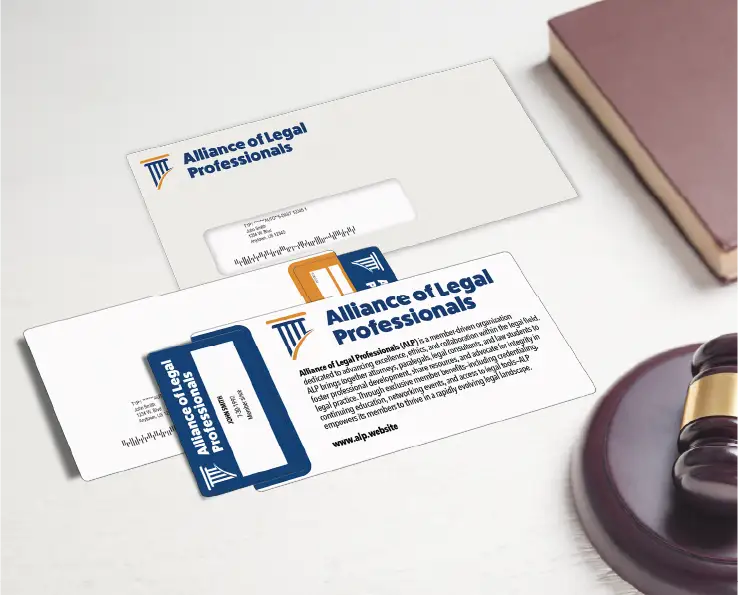
For dedicated renewal or winback campaigns, AcclaimMailer™ offers a polyester plastic postcard with durable break-off cards designed to help recipients retain an offer beyond the initial mailbox interaction.

AcclaimMailer™ combines a mailed message with durable break-off cards for renewal and winback offers.
Before Approving Membership Card Printing
Review artwork, data, and distribution together:
- List how members, staff, and partners use the card.
- Separate fixed artwork from variable fields.
- Test long names, multiple adults, and different tiers.
- Preserve leading zeros in member numbers and barcode data.
- Scan printed samples with your actual equipment.
- Review a physical sample or printed proof at actual size.
- Confirm replacement-card ordering and future updates.
- Plan fulfillment: individual distribution, carrier mailing, or larger membership packages.
Check that each personalized name, member number, and barcode belongs to the same record before approving the production file.
Frequently Asked Questions
What Size Is a Standard Membership Card?
The common CR80 format measures 3.375 by 2.125 inches and is typically 30 mils thick. It’s a familiar and wallet-friendly size also used for credit cards and gift cards. Use your manufacturer’s template to confirm dimensions, rounded corners, bleed, and safe zones.
Should a Membership Card Have an Expiration Date?
Include one when staff or partners check validity visually. Programs using current membership records may prefer a non-dated card. A member-since date recognizes longevity, not current eligibility.
Should the Member Number Go on the Front or Back?
Put it where staff use it most. Choose the front for frequent manual lookup or the back beneath the barcode for scanning-based programs.
Does Every Membership Card Need a Scannable Code?
No. Add one for a defined purpose, such as check-in, benefit verification, or opening member resources.
Is a QR Code Better Than a Barcode?
Choose a linear barcode when your check-in equipment uses that format. Choose a QR code for smartphone access to a website or when your equipment supports QR scanning. Test either with the intended devices.
What Should Membership Card Terms Say?
Keep terms short and specific. “Present this card for member benefits” may be sufficient. Add “Non-transferable” only when it matches your rules, and direct members online for complete terms.
Should Membership Cards Include Photos?
Include photos when visual identity verification is part of the program. Otherwise, names, member numbers, and membership tiers may provide the information staff need.
Turn Your Layout Into a Finished Membership Program
A useful membership card puts recognizable details on the front, functional information on the back, and sensitive data nowhere on the credential.
SSI Cards can help turn your field list into personalized Teslin® Membership Cards and Badges, NVIO™ cards, or Membership Card Mailers. Request a quote to coordinate materials, printing, and fulfillment.
By Sean Goade
Executive VP | SSI Cards Marketing & Direct Mail
About the Author
Sean Goade specializes in helping businesses and membership organizations leverage high-impact direct mail, membership cards, gift cards, loyalty cards and key tags, and personalized marketing solutions to support engagement, retention, and growth.